Getting started
Using FFB devices for anything other than their intended purpose may result in damage or injury
The authors of Bonus FFB accept no liability for any loss or damage including, without limitation, indirect or consequential loss or damage arising out of or in connection with the use of the software. Use Bonus FFB at your own risk.
1. Install vJoy
Install vJoy v2.2.2.0.
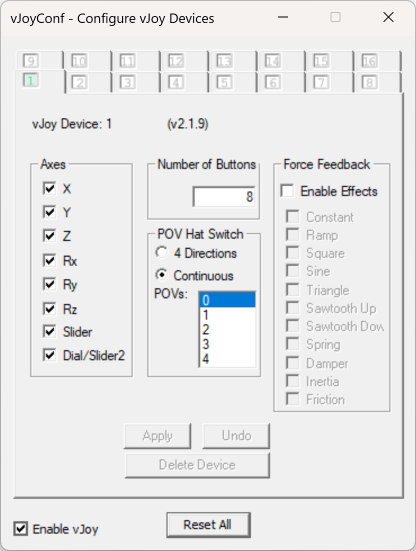
Run the "Configure vJoy" application. Set up at least one virtual device with a minimum of 16 buttons, and click the "Enable vJoy" checkbox:
2. Install telemetry plugins
American Truck Simulator/Euro Truck Simulator 2
Install RenCloud's scs-sdk-plugin DLL to the bin\win_x64\plugins folder of your ATS and ETS2 installations. These are the default locations when using Steam:
C:\Program Files (x86)\Steam\steamapps\common\American Truck Simulator\bin\win_x64\plugins\C:\Program Files (x86)\Steam\steamapps\common\Euro Truck Simulator 2\bin\win_x64\plugins\
When installed correctly, ATS/ETS2 will start with a notice that the SDK has been activated.
Unfortunately this message cannot be deactived, you will have to press OK each time the game is launched.
3. Configure your FFB joystick
Follow the device settings guide for your specific FFB joystick.
Some FFB joysticks will silently fail to work with Bonus FFB until correctly configured.
4. Install and configure Bonus FFB
Download and run the latest Bonus FFB installer.
Configure your input and output devices in the Settings > Configure input/output devices menu. Select each device and axis in the dropdown menus.
- A force-feedback enabled joystick and vJoy are required for all Bonus FFB modes
- Pedals are required for the heavy truck and H-shifter modes
- A shift lock device is optionally used by the PRNDL mode
Bonus FFB installs as a single application with a few modes:
- Heavy truck shifter for simulating heavy duty truck transmissions in ATS/ETS2
- H-pattern shifter for simulating manual transmissions
- "PRNDL"-style shifter for simulating automatic transmissions
- Push-pull hand control, simulating an assistive driving device for operating a vehicle's throttle and brakes with a single hand lever
- A simple handbrake lever
Please read the mode's guide for app-specific configuration, options, and features.
If your FFB joystick and other devices are correctly detected and configured, you can start the app by pressing the ▶️ button.
If you'd like other modes or have ideas for Bonus FFB, reach out on Discord or Github .